Raisa Live In Concert - General Sale Tickets
Promo period has expired (13 Mar 2026 - 07 Jun 2026)
 Kartu Kredit BCA
 Kartu Debit BCA
 Virtual Account
General Sale Tickets
Terms & Conditions:
Get BCA General Sale Tickets
- Valid from 13 March 2026 at 10.00 WIB until 7 June 2026 at raisaliveinconcert.com
- BCA General Sale tickets will be available based on the remaining ticket quota after the BCA Presale period
- Maximum 4 tickets per show per transaction
- Valid for payment with Virtual Account BCA, BCA Debit Mastercard, and BCA Credit Card Visa/Mastercard/JCB/American Express
- Enjoy BCA 0% installment for 3 months with minimum transaction of IDR500,000 using BCA Credit Card
- Ticket price excludes tax, service, and platform admin fees
Information about Raisa Live In Concert “Love & Let Go” with Andi Rianto & Magenta Orchestra
- Location: Jakarta Convention Center
- Date: 6 - 7 June 2026
- Seating Plan
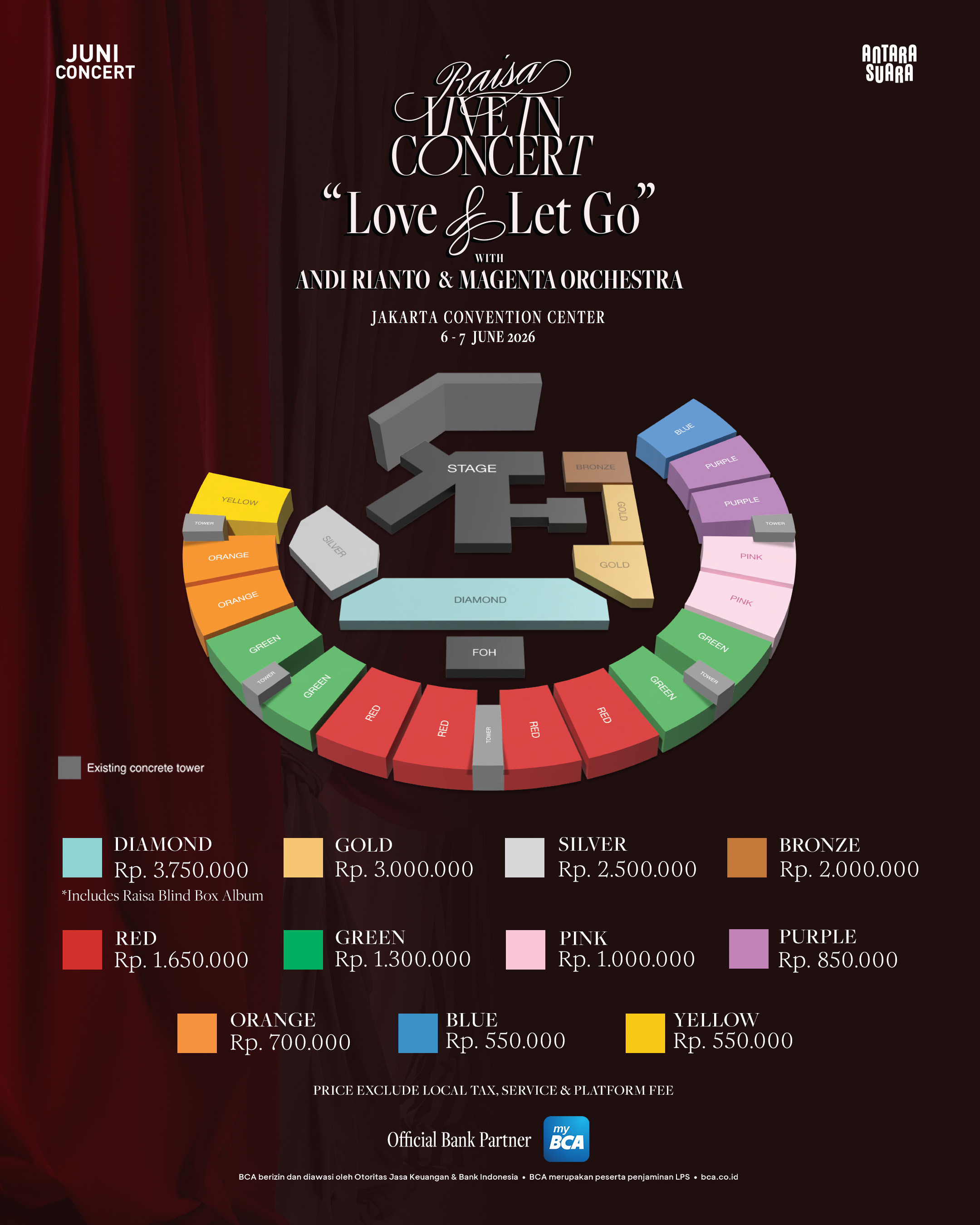
- For more detailed information, visit raisaliveinconcert.com
Ticket Purchase Guide by Payment Method
- Click the BCA Presale ticket purchase link sent to your registered email during pre-registration or visit raisaliveinconcert.com for General Sale
- Click “Buy Ticket” and select the desired ticket category
- Select Credit / Debit Card payment method
- Enter Credit Card Number, Expiry Date, and CVC/CVV
- Enter the OTP code for verification*
- Ensure the payment is successful
*) Make sure you have regular mobile credit on the phone number registered with your BCA Credit Card to receive the OTP code or set OTP delivery to the myBCA app (check how to do it here).
- Ensure BCA Debit Mastercard is activated for online transactions*
- Click the BCA Presale ticket purchase link sent to your registered email during pre-registration or visit raisaliveinconcert.com for General Sale
- Click “Buy Ticket” and select the desired ticket category
- Select Credit / Debit Card payment method
- Enter BCA Debit Mastercard number, Expiry Date, and CVC/CVV
- Enter the OTP code for verification**
- Ensure the payment is successful
*) Check how to activate Debit Online here.
**) Make sure you have regular mobile credit on the phone number registered with your BCA Debit Card to receive the OTP code or set OTP delivery to the myBCA app (check how to do it here).
BCA Virtual Account payments can be made through myBCA / BCA mobile / KlikBCA / ATM BCA*. Below is the payment guide using myBCA:
- Click the BCA Presale ticket purchase link sent to your registered email during pre-registration or visit raisaliveinconcert.com for General Sale
- Click “Buy Ticket” and select the desired ticket category
- Copy the Virtual Account number
- Open the myBCA app
- Select Transfer
- Select Virtual Account
- Enter the Virtual Account number
- On the confirmation page, the payment amount, merchant number, and merchant name will appear. Proceed if the information is correct
Check the BCA Virtual Account transaction limit here.